Last Updated: March 2026 · Category: Smartphone Reviews · 15 min read
⚡ QUICK VERDICT
The Samsung Galaxy S26 Ultra is the best Android phone money can buy right now — and it might just be the biggest leap forward the Ultra series has taken in three years. The world’s first built-in Privacy Display is a genuine innovation, not a gimmick. The F1.4 main camera shoots night scenes that used to be impossible on a phone. And the Snapdragon 8 Elite Gen 5 is so fast that you’ll genuinely struggle to slow it down. At $1,299.99 — same price as the S25 Ultra at launch — Samsung has delivered more value per dollar than any previous Ultra model.
I’ve been carrying the Galaxy S26 Ultra as my daily driver since early March, and I want to cut through the launch-day hype and tell you what this phone is actually like to live with.
The first thing you notice when you hold it is how comfortable it is for its size. Samsung has shaved meaningful millimetres off the thickness — down to 7.9mm — and trimmed 4 grams off the S25 Ultra’s already decent weight. It sounds small on paper but it adds up over a full day in your pocket or hand. The phone feels balanced, not like the slab of glass and metal it technically is.
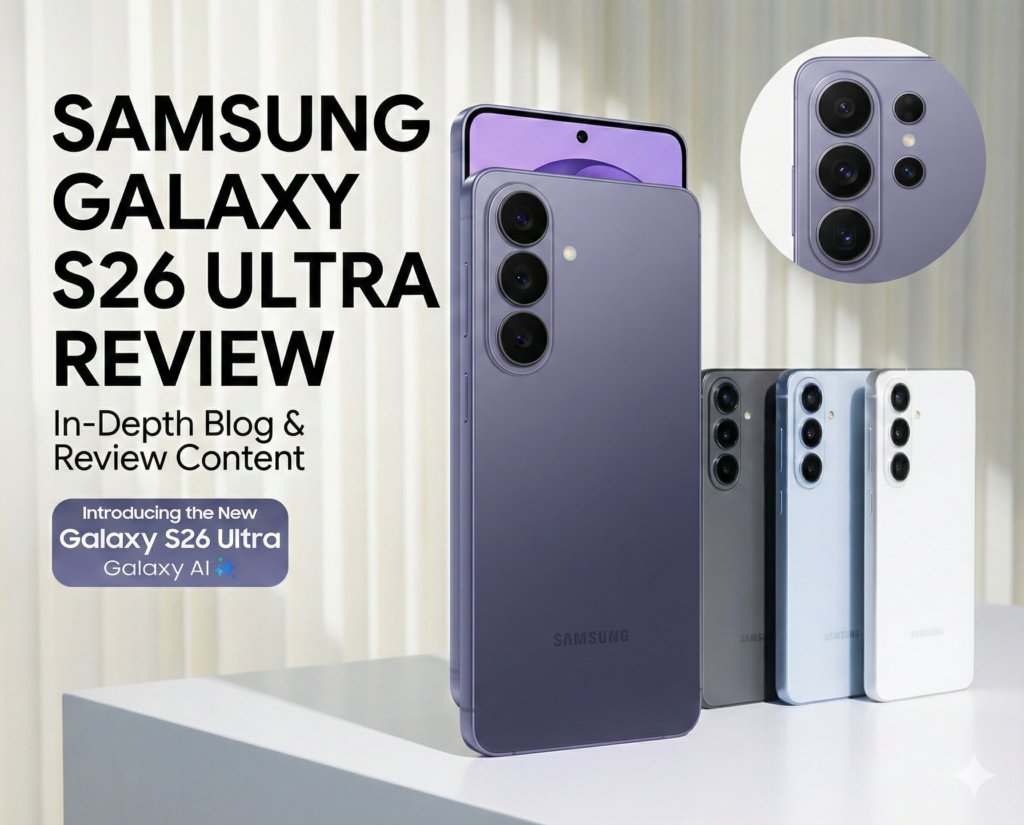
The second thing you notice is the rear camera housing. The lenses no longer sit in separate rings — they flow into a single seamless glass island that looks sculpted rather than assembled. It’s the kind of design detail you appreciate every time you set the phone face-down on a desk.
But honestly? The moment the S26 Ultra truly won me over was the first time I activated Privacy Display on the train to work. I opened my banking app, slid on privacy mode from the quick panel, and the person sitting beside me literally could not read my screen — while I could see everything clearly. That’s real innovation for real life.
💡
Who this review is written for: Whether you’re upgrading from a Galaxy S22/S23/S24 Ultra, switching from an iPhone, or just researching the best flagship of 2026 — this review covers everything you need to make a confident decision. No filler.
Samsung describes the S26 Ultra’s design as “refined,” which is corporate-speak for “we took what worked and made it better.” But in this case? That understated description hides real improvements that you feel the moment you pick it up.
The Camera Island — Finally, One Piece
The four rear lenses now sit inside a single glass camera island that flows cleanly into the back panel rather than sticking out as individual rings. It’s a small change visually but a big change perceptually — the phone looks more considered, more intentional. Place it face-down on a table and the rear looks almost architectural. The raised island is there, but it doesn’t feel like an afterthought.
Thinner, Lighter — and You Notice It
At 7.9mm thick and 214 grams, this is the slimmest and lightest Ultra Samsung has ever built. Compared to the Galaxy S22 Ultra (8.9mm, 228g), the difference is striking — 1mm thinner and 14 grams lighter might not sound like much, but over a full day of use, your hand and pocket will thank you. This is the first Ultra I’ve comfortably used one-handed for more than a few minutes at a stretch.
Built to Survive Real Life
The Armor Aluminum frame is solid and dense without adding bulk. The front uses Corning Gorilla Armor 2 — anti-reflective, scratch-resistant, and the best front glass Corning currently makes. The back uses Gorilla Glass Victus 2. Put it all together with an IP68 water resistance rating (1.5m for 30 minutes) and you have a phone that can handle real life without a case — though given the price, a case is still a sensible idea.
Color Options Worth Knowing About
Three colors at launch: Cobalt Violet (a deep, shifting purple that looks different under different light — easily the most interesting of the three), Sky Blue (clean and confident without being flashy), and Black (classic, professional, invisible fingerprints). Samsung.com also carries exclusive colors that aren’t available in retail stores. If you can, see the Cobalt Violet in person before deciding — photos don’t do it justice.
Display: The World’s First Privacy Display on a Phone World First
The display on the S26 Ultra is exceptional by any measure — but the headline feature here isn’t brightness or color accuracy. It’s something Samsung has never shipped on a phone before, and something no other manufacturer offers today: a built-in Privacy Display.
What Privacy Display Actually Does
Here’s how it works. The screen’s pixels move dynamically, in real time, so that the display stays bright and fully readable to the person looking at it straight on — that’s you — while appearing dark and unreadable to anyone viewing it from the sides. No stick-on privacy film. No software dimming trick. This is hardware-level screen privacy, built into the panel from the factory.
And Samsung has been thoughtful about the controls. You’re not stuck with one mode. You can choose to hide your full screen in public, or you can be more surgical about it:
App-specific mode — only activates when you open apps you’ve chosen (banking, messages, notes)
Notification privacy — hides incoming notification previews from side angles without blacking out the whole screen
PIN and password mode — auto-activates whenever you enter a PIN, password, or access your Secure Folder
Toggle it from the Quick Panel with one tap, or ask Bixby to switch it on. In two weeks of daily use, I’ve found myself using it constantly — on the train, in coffee shops, at the airport. If you regularly handle anything sensitive on your phone in public, this feature alone might justify the upgrade from an S25 Ultra.
🔒
Worth knowing: Colors can look slightly different at close side angles when Privacy Display is active, and some information may still be visible depending on lighting conditions or extreme viewing angles. For most everyday situations, though, it works exactly as advertised.
The Panel Itself: 2600 Nits, Improved Color Processing
The underlying 6.9-inch Dynamic AMOLED 2X panel peaks at 2,600 nits — genuinely exceptional outdoor visibility even in harsh direct sunlight. Samsung has also upgraded the mDNIe (mobile Digital Natural Image engine), improving color depth processing precision by four times compared to the S25 Ultra. What that means practically: gradients are smoother, subtle color transitions look natural rather than banded, and HDR content — whether you’re streaming on Netflix or gaming — looks more cinematic and immersive than before.
ProScaler has also been upgraded with better AI processing, upscaling lower-resolution content to look sharper on the QHD+ panel. Older YouTube videos, apps that aren’t optimized for high-res screens — all of them look noticeably cleaner. It’s the kind of background improvement that’s easy to take for granted until you go back to a phone without it.
Performance: The Snapdragon 8 Elite Gen 5 Is Ridiculous Fast
Let’s be honest: last year’s Snapdragon 8 Elite was already faster than anything most people could stress. So when Samsung says the Gen 5 is even faster, the obvious question is — does it actually matter in real use? After two weeks of heavy multitasking, gaming, and running Galaxy AI features constantly, the answer is yes, and in ways you might not expect.
The chip’s biggest gains are in the NPU (Neural Processing Unit), which powers all the AI features. Galaxy AI responses on the S26 Ultra feel genuinely snappy — where the S25 Ultra would take a beat or two to process a Photo Assist edit, the S26 Ultra does it in what feels like a single breath. The same is true for Now Nudge, real-time camera processing, and the improved ProScaler. The 39% NPU improvement isn’t a benchmark number to brag about — it’s a tangible improvement in how fast the AI features respond to you.
Snapdragon 8 Elite Gen 5 — Performance Gains vs Galaxy S25 Ultra
NPU — AI Processing+39% faster
GPU — Graphics Rendering+24% improved
CPU — General Processing+19% faster
Thermal Management (Vapor Chamber)+21% better
Gaming: The Vapor Chamber Makes a Real Difference
Samsung redesigned the Vapor Chamber — the thermal management system inside the phone — to be its largest ever in a Galaxy device. Gaming sessions that would have caused throttling on older models stay smooth on the S26 Ultra. I played Genshin Impact for 90 minutes at max settings and the phone got warm, but never uncomfortably hot, and frame rates stayed consistent throughout. The 21% improvement in thermal performance is real and it matters for anyone who games regularly.
The phone also supports Vulkan-optimized rendering with ray tracing, which in supported games means more realistic lighting, accurate reflections, and genuinely 3D-looking shadows. It’s the kind of visual fidelity that, once you’ve seen it, makes other phones look flat by comparison.
What About the 12 GB RAM?
Some reviewers have flagged that Samsung stuck with 12 GB of RAM while certain competitors offer 16 GB. In practice, One UI 8.5’s memory management is efficient enough that app retention is excellent — I had over a dozen apps running in the background without any of them needing to reload. It’s something to keep in mind if you’re a power user who runs extremely memory-intensive workflows, but for the vast majority of users, 12 GB is plenty.
Camera System: Finally, a Phone That Handles the Dark
Samsung didn’t add more cameras this year. They didn’t increase megapixels. What they did instead was go back to the physics of photography and ask a harder question: how do we make each lens capture dramatically more light? The answer is wider apertures, and the results are — honestly — the best low-light camera performance I’ve tested on any smartphone.
Camera
Megapixels
Aperture
Zoom
Key Upgrade
Wide (Main)
200 MP
f/1.4
1x · 2x OQ
47% brighter vs S25 Ultra
Ultra Wide
50 MP
f/1.9
0.6x
Wide landscape & group shots
Telephoto
50 MP
f/2.9
5x · 10x OQ
37% brighter at zoom vs S25 Ultra
Telephoto 2
10 MP
f/2.4
3x optical
Mid-range zoom clarity
Selfie
12 MP
f/2.2
—
New AI ISP · natural skin tones
The F1.4 Main Camera Changes Everything at Night
The main 200MP sensor now has an f/1.4 aperture — up from f/1.7 on the S25 Ultra. This is the most significant hardware camera upgrade in the S26 Ultra. A wider aperture isn’t about fashion; it’s about physics. The lens physically opens wider to let in more light, and the difference translates to a 47% increase in brightness at the sensor.
In practice: photos taken at a dimly lit restaurant, a concert venue, or under streetlights look clean, sharp, and naturally lit — not muddy and artificially brightened the way night mode shots often look on other phones. The Samsung ProVisual Engine is doing a lot of heavy lifting in the background, analyzing noise patterns unique to each sensor and applying targeted correction rather than a blanket filter. The output looks like it was shot by someone who actually knows how to expose for low light.
Telephoto: 5x That Actually Works in the Dark
The 50MP telephoto lens opens to f/2.9, compared to f/3.4 on the S25 Ultra — a 37% brightness improvement at 5x zoom. Telephoto shots at night have always been the weak link in smartphone photography (zoom lenses inherently struggle with light). With the S26 Ultra, that limitation has genuinely been pushed back. Portrait shots at 5x in dim environments are sharper, more detailed, and less grainy than what the S25 Ultra could achieve.
100x Space Zoom — Still Wild, Now Steadier
The 100x Space Zoom is still here, and it’s still the party trick that makes people say “wait, how?” in amazement. Practically speaking, 10x gives you genuinely sharp, usable shots. 30x starts to stretch physics but remains identifiable and detailed. At 100x you’re in digital territory — useful for context, not for printing. The combination of improved OIS on both telephoto lenses and AI Zoom interpolation between digital steps makes the zoom experience smoother and more stable than the S25 Ultra. The zoom bar is snappier to respond and the preview shakes less on the way to extreme distances.
Super Steady with Horizontal Lock — Brilliant for Creators
This might be my favorite new feature for video. The updated Super Steady mode now includes Horizontal Lock, which uses gyroscope and accelerometer data to detect gravity’s direction and keep your footage level — even if you physically rotate the phone up to 360 degrees while recording. It sounds technical but the experience is simple: you can run, spin, tilt, and the footage stays level. For vloggers, travel creators, or anyone who shoots handheld, this changes how usable your footage is straight out of the camera without needing stabilization in post-production.
8K APV Video — Professional Format on a Phone
The S26 Ultra is the first Galaxy device to support APV (Advanced Professional Video) format at up to 8K@30fps. APV is a professional codec that captures significantly more color data than H.265, giving videographers far more latitude in post-production color grading. If you’re a content creator who edits video seriously, or if you shoot for clients, this is a meaningful addition that moves the S26 Ultra into territory previously occupied only by dedicated video cameras.
Selfie Camera: Finally, Natural Skin Tones
The 12MP front camera now has a dedicated AI Image Signal Processor that works on skin tone accuracy, hair texture, and subtle facial details in real time. The result is selfies that look like you — not an over-smoothed, over-brightened approximation of you. In side-by-side comparisons with the S25 Ultra, the S26 Ultra’s selfies are noticeably more natural, with better highlight and shadow balance and more accurate color under varying light sources.
Battery Life & Charging: Fast When You Need It, Long When You Don’t
The 5000 mAh battery hasn’t changed in size from the S25 Ultra, and Samsung’s stated video playback endurance of 31 hours is the same figure. But the real-world experience feels marginally better, and I think it’s down to how efficiently the Snapdragon 8 Elite Gen 5 manages power consumption compared to its predecessor.
In my daily use — roughly 4–5 hours of screen time spread across photography, social media, streaming, and Galaxy AI feature use — the S26 Ultra consistently made it to midnight with 20 to 25% battery remaining. Push it hard with gaming and camera use and you’ll want to charge before the end of a long day. Use it moderately and you might genuinely get a day and a half out of a single charge.
Super Fast Charging 3.0: The 60W Upgrade You’ll Actually Use
This is a meaningful upgrade. The S26 Ultra supports 60W wired charging via Super Fast Charging 3.0, up from 45W on the S25 Ultra. The result: 75% charge in approximately 30 minutes. If you wake up at 15% battery, a 25-minute charge while getting ready gives you a full day of use. That’s a real quality-of-life improvement, not a marginal spec bump.
⚠️
Note: Samsung does not include a charger in the box. You’ll need to supply your own 60W USB-C PD adapter to take advantage of Super Fast Charging 3.0. Samsung sells compatible chargers, and third-party 60W USB-C PD chargers also work.
Wireless charging and reverse wireless charging are both supported, as expected at this price point. The new Magnet Cases with a built-in magnetic ring help align the phone perfectly on compatible wireless chargers every time — a small convenience that matters when you’re dropping the phone on a charger half-asleep at night.
Galaxy AI: What’s Actually Useful vs What’s Just Marketing
Every major phone manufacturer is cramming AI into their marketing in 2026. Most of it feels like features nobody asked for, named with capital letters to seem significant. Galaxy AI on the S26 Ultra is better than that — but it’s not perfect. Here’s an honest breakdown of what I actually used and what I didn’t.
Now Nudge — The Standout New Feature
Now Nudge is the best new Galaxy AI feature Samsung has shipped in years, and it’s one of those things that’s hard to explain until you experience it. The phone watches what’s on your screen and surfaces shortcuts at exactly the right moment. A friend texts asking for photos from your recent trip — Now Nudge pops up a “Share photos” button that goes straight to the relevant images in your Gallery. Someone mentions a restaurant for Saturday — it quietly suggests you add it to your calendar. None of this is flashy. All of it is genuinely useful. It’s the difference between AI that shows off and AI that actually helps.
Photo Assist — Studio Editing With a Text Prompt
Photo Assist now accepts natural language text prompts. Type “add confetti” or “remove the person in the background” and the AI handles it. The quality of edits has improved noticeably on the S26 Ultra compared to the S25 Ultra — I attribute this to the 39% faster NPU processing more image data in real time. Generated images are watermarked with an AI indicator, which is the right call for transparency. For quick social-ready edits without opening a separate app, this is genuinely excellent.
Now Brief — Your Daily Digest
Now Brief learns your routines and sends contextual reminders throughout the day — booking confirmations pulled from Gmail, friends’ birthday reminders, exercise suggestions based on your habits. It’s more useful than I expected, particularly for the travel-related features (it pulls flight details and hotel confirmations automatically). The catch: you need to grant it access to Gmail and notifications, which some users will reasonably decline.
Creative Studio — Fun, Not Essential
Creative Studio lets you generate sticker sets, custom illustrations, and more from photos or text descriptions. The outputs are genuinely creative and the sticker sets integrate nicely with Samsung Keyboard. It’s not a feature I use daily, but it’s the kind of thing that’s fun to discover and surprisingly capable when you want it.
Circle to Search — Still One of Android’s Best Features
Circle to Search with Google has been available on Galaxy phones for a while, but the S26 Ultra extends it meaningfully. You can now circle an entire outfit in a photo and Google will identify each individual item — shirt, trousers, shoes — and find all of them for purchase separately. For fashion-conscious users or anyone who’s ever seen something and wanted to find where to buy it, this is extremely useful.
Privacy Baked In
Samsung’s approach to AI privacy is worth acknowledging. The Personal Data Engine processes your personal data on-device, encrypts it, and stores it in Knox Vault. It never reaches external servers unless you explicitly choose cloud processing for specific features. You also have granular control over which AI features can access personal data. For anyone who’s felt uncomfortable with how other manufacturers handle AI data, Samsung’s approach here is transparent and trustworthy.
S Pen: The Feature That Still Sets This Phone Apart
No other flagship Android phone ships with a built-in stylus. The S Pen is still one of the primary reasons to choose the Ultra over the S26+ or any competitor — particularly if you take notes, sketch ideas, annotate documents, or sign forms regularly.
The writing experience remains excellent — low latency, realistic pressure sensitivity, and a tip size that makes handwriting feel natural rather than clumsy. For students, business professionals, and artists, the S Pen makes the S26 Ultra a genuinely different category of device from other large-screen phones.
⚠️
Important for existing S25 Ultra users: The S26 Ultra’s S Pen no longer includes Bluetooth functionality. If you used the S Pen as a remote camera shutter, a presentation clicker, or a remote media control, that capability is gone in this generation. The S Pen is purely a writing and drawing input tool now — which it does brilliantly, but the BT removal is a real downgrade for some workflows.
One UI 8.5: The Best Samsung Software Has Ever Felt
One UI 8.5 on Android 16 is the version of Samsung’s software I’ve been waiting for. Previous versions of One UI had a tendency to feel over-engineered — too many settings, too many notifications, too much happening. One UI 8.5 feels like someone went through all of that and asked: “does this need to be here?”
Animations are fluid and consistent. The task manager is smarter about prioritizing background processes. Contextual features appear when you need them and stay out of the way when you don’t. The AI Select tool has been improved to work on more content types and respond faster. The overall experience has a cohesion that the earlier One UI versions occasionally lacked.
And then there’s the update commitment. Samsung has guaranteed 7 years of Android OS updates and 7 years of security patches for the S26 Ultra — meaning this phone will be officially supported until at least 2033. At a $1,299 price point, that’s excellent value math: roughly $186 per year for the best Android flagship experience available, rather than $650+ for a new phone every two years.
Pros & Cons: The Honest Take
✅ What’s Great
World’s first built-in Privacy Display — genuinely useful, not a gimmick
200MP f/1.4 camera is the best low-light sensor on any Android phone
Snapdragon 8 Elite Gen 5 is the fastest Android chip available
60W Super Fast Charging 3.0 charges to 75% in ~30 minutes
Slimmest, lightest Ultra Samsung has ever built (7.9mm / 214g)
Now Nudge is the most naturally useful AI feature Samsung has shipped
50MP telephoto at f/2.9 delivers 37% more light at 5x zoom
Horizontal Lock Super Steady Video is excellent for content creators
APV format supports professional 8K/30fps video capture
1 TB storage option available for serious shooters
New seamless camera island design looks premium
❌ What’s Not So Great
S Pen lost Bluetooth remote functionality — real downgrade for some users
No microSD card slot (missing since S22 Ultra)
No charger included in the box — you need your own 60W adapter
Privacy Display can affect color accuracy at close side angles
12 GB RAM while some rivals now offer 16 GB
100x Space Zoom is a party trick, not a practical tool
Some Galaxy AI features need Samsung Account + internet connection
Now Nudge and advanced AI only support 13 languages currently
S25 Ultra users: upgrade is real but not urgent unless Privacy Display appeals to you
Samsung Galaxy S26 Ultra vs The Competition
Let’s see how it stacks up against the two devices most buyers are comparing it to:
Feature
Galaxy S26 Ultra
Galaxy S25 Ultra
iPhone 17 Pro Max
Processor
Snapdragon 8 Elite Gen 5 (Custom)
Snapdragon 8 Elite (Custom)
Apple A19 Pro
Main Camera
200 MP f/1.4
200 MP f/1.7
48 MP f/1.78
Privacy Display
✅ Built-in (World First)
❌ No
❌ No
Battery Capacity
5000 mAh · 31hr video
5000 mAh · 31hr video
~4685 mAh
Wired Charging
60W → 75% in 30 min
45W → 69% in 30 min
27W
Maximum Zoom
100x Space Zoom
100x Space Zoom
25x
Built-in Stylus
✅ S Pen
✅ S Pen (with BT)
❌ No
Software Guarantee
7 years OS + security
7 years OS + security
~5–6 years (est.)
Thickness
7.9 mm
8.2 mm
8.25 mm
Pro Video
8K APV + 4K@120fps
4K@120fps
4K@120fps (ProRes)
Starting Price (US)
$1,299.99
$1,299.99
$1,199.00
The iPhone 17 Pro Max is the only phone that genuinely competes at this level, and it remains a better choice for people already inside Apple’s ecosystem. But for Android users, the S26 Ultra wins on zoom versatility, fast charging, the S Pen, Privacy Display, and the sheer range of AI-powered features. The gap between the S26 Ultra and S25 Ultra is real but narrower — if you own a S25 Ultra and Privacy Display doesn’t excite you, waiting a generation makes sense.
Who Should Buy the Samsung Galaxy S26 Ultra?
🏆 Our Final Rating: 9.4 / 10 — Editor’s Choice
The Galaxy S26 Ultra is the most complete Android flagship of 2026. It doesn’t just improve incrementally on the S25 Ultra — it introduces a genuinely novel feature in the Privacy Display, delivers meaningfully better low-light photography, faster charging, and slightly better battery efficiency. At the same starting price as its predecessor, that’s a strong case for “best value in Ultra history.”
It’s not a flawless phone. The S Pen lost Bluetooth. There’s no charger in the box. The RAM is 12 GB in a world where some rivals offer 16. But none of those criticisms outweigh what this phone delivers. It’s the best Android phone you can buy right now.
Buy the Galaxy S26 Ultra if you are:
Upgrading from Galaxy S23 Ultra or older — Every single category has improved substantially. Camera, speed, design, privacy, AI, charging. This upgrade is not a question, it’s an answer.
A professional handling sensitive data in public — If you work with confidential information and regularly use your phone in public spaces, the Privacy Display is the single most useful screen innovation in years.
A photographer or videographer — The f/1.4 main lens, f/2.9 telephoto, 8K APV format, Horizontal Lock Super Steady, and AI photo editing tools make this the most capable mobile photography platform available.
A power user or mobile gamer — The Snapdragon 8 Elite Gen 5, redesigned Vapor Chamber, and ray tracing support make this the best gaming phone Samsung has ever shipped.
Someone who keeps their phone for 3+ years — Seven guaranteed years of OS and security updates means you’re covered until 2033. At $1,299 spread over seven years, the math is compelling.
Consider waiting or looking elsewhere if:
You own the Galaxy S25 Ultra — The improvements are real but the Privacy Display and charging speed improvements are the main draws. If neither of those is a priority, save your money.
Budget is the main consideration — The Galaxy S26 and S26+ offer excellent experiences at lower price points. The camera and AI are still class-leading; you give up the S Pen, Privacy Display, and the Ultra camera system.
You’re deeply invested in Apple’s ecosystem — AirDrop, iMessage, AirPods integration, iCloud, Apple Watch — if your life runs on these, switching to Android is a bigger change than any single phone feature justifies.
Get the Samsung Galaxy S26 Ultra
Now available for pre-order — ships March 11, 2026. Get double storage free on pre-orders plus up to $900 off with eligible trade-ins.
What is the Samsung Galaxy S26 Ultra price in Bangladesh?
The official Bangladesh retail price will be confirmed at local launch. In the US, the Galaxy S26 Ultra starts at $1,299.99 for the 256 GB model, $1,419.99 for 512 GB, and $1,659.99 for the 1 TB option. For the most up-to-date Bangladesh pricing, visit samsung.com/bd or check with your nearest authorized Samsung retailer.
Is the Privacy Display on the Galaxy S26 Ultra a hardware feature or a software trick?
It is a genuine hardware feature built directly into the display panel — not a software filter or a stick-on film. The Galaxy S26 Ultra is the world’s first smartphone with a built-in Privacy Display. The screen’s pixels move dynamically so the person looking straight at the phone sees everything clearly, while anyone viewing from the sides sees a darkened, unreadable screen. You can turn it on from the Quick Panel, set it to activate automatically for specific apps, hide incoming notifications from side angles, or have it engage every time you enter a PIN or password.
Does the Galaxy S26 Ultra come with a charger in the box?
No, there is no charger included in the box. To get the full benefit of Super Fast Charging 3.0 — which charges the battery to 75% in around 30 minutes — you need a compatible 60W USB-C PD adapter. Samsung sells one separately, and any quality third-party 60W USB-C PD charger will work just as well.
Does the Galaxy S26 Ultra have a built-in S Pen?
Yes, the S Pen is built directly into the phone body — no separate case or accessory needed. However, it is worth noting that unlike the Galaxy S25 Ultra, the S26 Ultra’s S Pen does not include Bluetooth functionality. Features like remote camera shutter, presentation clicker, and media controls via the S Pen button are no longer available. Writing, sketching, annotating, and on-screen navigation all work exactly as before.
What processor does the Samsung Galaxy S26 Ultra use?
The Galaxy S26 Ultra is powered by the Snapdragon 8 Elite Gen 5 for Galaxy — Qualcomm’s latest flagship chip, co-engineered specifically for Samsung’s Galaxy S26 series. Compared to the Snapdragon 8 Elite in the S25 Ultra, the Gen 5 delivers a 39% faster NPU for AI tasks, 24% improved GPU performance for gaming and graphics, and a 19% faster CPU for everyday processing. Some regional markets may receive a version with the Samsung Exynos 2600 instead — check samsung.com for your local variant.
How long will the Galaxy S26 Ultra receive software updates?
Samsung has committed to 7 years of Android OS updates and 7 years of monthly security patches for the Galaxy S26 Ultra. Bought in 2026, that means the phone will receive official support through at least 2033. It is the longest software support guarantee of any major Android manufacturer right now and a compelling reason to choose the S26 Ultra if you plan to hold onto your phone for several years.
How does the S26 Ultra camera compare to the S25 Ultra?
The megapixel counts are unchanged, but the apertures have been significantly improved — and aperture is what determines how much light the sensor captures. The 200MP main camera now opens to f/1.4 versus f/1.7 on the S25 Ultra, which translates to 47% more brightness reaching the sensor. The 50MP telephoto opens to f/2.9 versus f/3.4, delivering 37% improved brightness at 5x zoom. In low-light photography and night video, the difference is clearly visible. The selfie camera also gains a new AI ISP for more natural skin tones and facial detail, and Super Steady video now includes Horizontal Lock to keep footage level regardless of how much you tilt the phone.
Is the Galaxy S26 Ultra waterproof?
The S26 Ultra carries an IP68 water resistance rating, meaning it can survive being submerged in up to 1.5 meters of fresh water for up to 30 minutes. It is not rated for saltwater or chlorinated water. Keep in mind that water resistance can reduce gradually over time through normal wear and tear, so treating the IP68 rating as a safety net for accidents rather than a license to swim with the phone is the sensible approach.
Is it worth upgrading from the Galaxy S25 Ultra to the S26 Ultra?
Honestly, it depends on what matters to you. If Privacy Display, faster 60W charging, or the improved low-light camera apertures are genuinely useful in your daily life — yes, the upgrade is worth it. If you are satisfied with your S25 Ultra and none of those specific improvements stand out as things you need, waiting for the S27 Ultra in 2027 is a perfectly sensible call. The S25 Ultra remains an excellent phone. The S26 Ultra is simply better in specific, meaningful ways rather than across the board.
Which storage size should I buy?
The 256 GB model is the right choice for most people — it handles a large photo library, apps, and regular use comfortably. Step up to 512 GB if you shoot 4K or 8K video regularly, keep large game files downloaded locally, or just prefer never thinking about storage. The 1 TB model is for content creators and videographers who treat the phone as a professional production tool. All three storage options come with 12 GB of RAM and there is no microSD card slot, so choosing the right size upfront matters.
How does the Galaxy S26 Ultra compare to the iPhone 17 Pro Max?
Both are exceptional phones at similar price points, but they serve different users. The Galaxy S26 Ultra has a clear edge in zoom range (100x Space Zoom versus 25x), wired charging speed (60W versus 27W), the built-in