
Published: March 5, 2026 | Updated: March 5, 2026 Reading Time: ~9 minutes Verdict: ⭐⭐⭐⭐½ (4.5/5) — Best value laptop Apple has ever made.
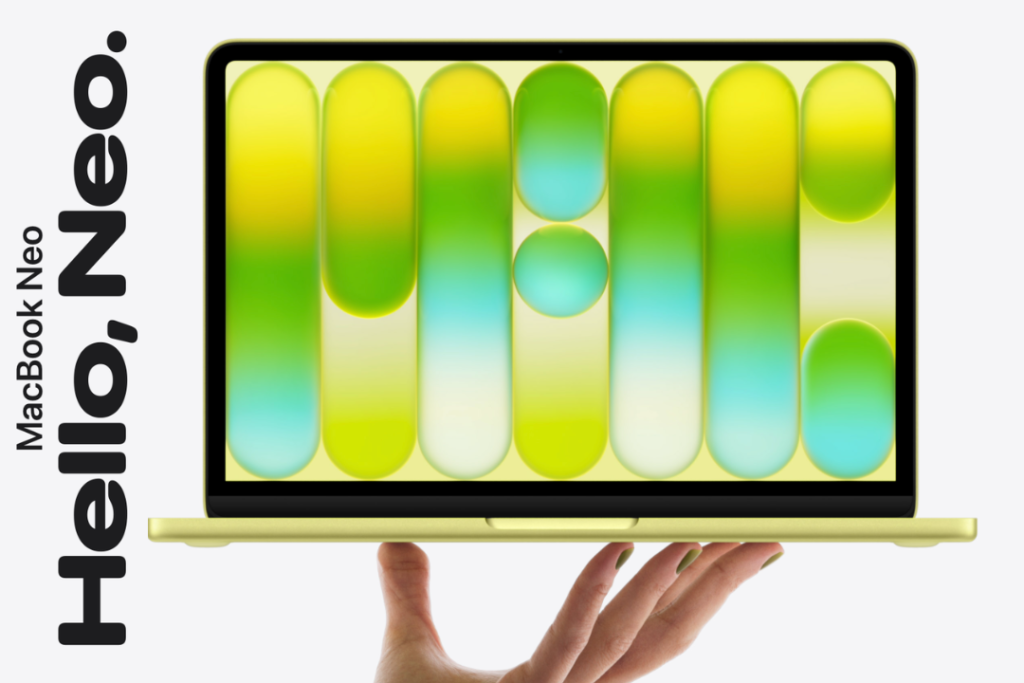
Apple just rewrote the rules. The company that built its reputation on premium pricing has done the unthinkable — launched a full MacBook, aluminum body and all, for just $599. Meet the MacBook Neo: the most affordable Mac laptop in Apple history, announced on March 4, 2026, with availability starting March 11, 2026.
But here’s the real question: is the MacBook Neo a genuine deal, or is it Apple cutting corners to hit a price point? After deep-diving into everything Apple has shared, comparing it against competitors, and dissecting every spec — here’s the complete, honest MacBook Neo review you need before buying.
What Is the Apple MacBook Neo? (Quick Overview)
The MacBook Neo is Apple’s brand-new entry-level laptop — the first Mac ever powered by an A-series chip (the A18 Pro) rather than the M-series chips found in MacBook Air and Pro models. It sits below the MacBook Air in Apple’s lineup and is designed specifically for students, budget-conscious buyers, families, and anyone switching from Windows or Chromebook.
It’s lightweight, colorful, quiet (completely fanless), and runs macOS Tahoe with full Apple Intelligence support. And at $599 — or $499 for education customers — it’s the most aggressive pricing move Apple has made in the laptop space in over a decade.
MacBook Neo Full Specs (2026)
| Spec | Details |
|---|---|
| Display | 13-inch Liquid Retina, 2408×1506 resolution |
| Brightness | 500 nits |
| Color Support | 1 billion colors, anti-reflective coating |
| Processor | Apple A18 Pro (6-core CPU: 2 performance + 4 efficiency) |
| GPU | 5-core integrated GPU |
| Neural Engine | 16-core Neural Engine |
| RAM | 8GB unified memory |
| Storage | 256GB (base) / 512GB |
| Battery Life | Up to 16 hours |
| Camera | 1080p FaceTime HD |
| Audio | Dual side-firing speakers with Spatial Audio, dual mics |
| Ports | 2x USB-C (USB 3 left, USB 2 right), 3.5mm headphone jack |
| Connectivity | Wi-Fi 6E, Bluetooth 6 |
| Weight | 2.7 lbs |
| Colors | Silver, Blush, Citrus, Indigo |
| OS | macOS Tahoe |
| Starting Price | $599 ($499 for education) |
| Availability | March 11, 2026 |
Design & Build Quality — Surprisingly Premium for $599
Let’s start here, because Apple’s biggest flex with the MacBook Neo is that it doesn’t feel like a budget laptop.
The chassis is solid aluminum — the same material used in the MacBook Air and Pro. At just 2.7 pounds, it’s light enough to drop in a bag without thinking twice. The corners are soft and rounded, giving it an elegant feel that’s a step above the plastic-heavy competition in this price range.
What makes the Neo genuinely stand out visually is its color lineup. Four options — Silver, Blush, Citrus, and Indigo — are available, with the matching-colored Magic Keyboard adding a cohesive, intentional aesthetic. The fresh Citrus yellow is bold, fun, and immediately eye-catching. This is the most colorful MacBook Apple has ever released.
The keyboard uses Apple’s beloved Magic Keyboard layout for comfortable, precise typing. The large Multi-Touch trackpad supports all the intuitive gestures macOS users rely on daily.
One notable omission: no keyboard backlight. This is a cost-cutting tradeoff that’s worth knowing before you buy, especially if you work in dim environments.
Display — A Screen That Punches Well Above Its Price Class
The 13-inch Liquid Retina display at 2408×1506 resolution with 500 nits of brightness and support for 1 billion colors is genuinely impressive for a $599 machine.
For context: most Windows laptops and Chromebooks in this price range ship with 1080p TN panels at 250–300 nits. The MacBook Neo’s display is noticeably brighter, sharper, and more vivid than anything else near this price point.
The anti-reflective coating makes it easy to use in bright environments — classrooms, coffee shops, outdoors — without fighting glare. Whether you’re editing photos, streaming movies, or just browsing, the screen delivers a quality experience that won’t make you feel like you compromised.
Performance — The A18 Pro Does Heavy Lifting
Here’s where things get fascinating. The MacBook Neo runs on the Apple A18 Pro — the same chip family that powers the iPhone 16 Pro. This marks the first time Apple has used a mobile-class A-series chip in a Mac laptop, and the results are compelling.
Real-World Performance Numbers (Apple’s Testing, Jan–Feb 2026)
- Up to 50% faster for everyday tasks (web browsing, documents, streaming) vs. the bestselling Intel Core Ultra 5 PC
- Up to 3x faster for on-device AI workloads vs. competing Intel-based laptops
- Up to 2x faster for photo editing tasks
The 6-core CPU (2 performance + 4 efficiency cores) handles multitasking smoothly. You can run Messages, WhatsApp, Canva, Excel, and Safari simultaneously without slowdowns. The 5-core GPU handles casual gaming and creative tasks well, though it won’t compete with dedicated GPU laptops for heavy 3D workloads.
The 16-core Neural Engine is what powers Apple Intelligence features — summarizing notes, cleaning up photos, on-device AI tasks — all processed locally on-device, keeping your data private.
One huge practical advantage: the MacBook Neo is completely fanless. It runs in total silence, always. No fan noise during video calls, no heat throttling during study sessions.
What the A18 Pro Means vs. M-Series
The A18 Pro is not as powerful as the M4 or M5 chips in the MacBook Air and Pro. For power users running Final Cut Pro, heavy coding environments, or complex 3D rendering — the MacBook Air M5 (starting at $1,099) is the better tool. But for the target audience of this machine — students, general users, first-time Mac owners — the A18 Pro is more than enough computing power.
Battery Life — All-Day, No Excuses
Apple claims up to 16 hours of battery life, tested with wireless web browsing on Wi-Fi. Real-world mixed use will likely land in the 12–14 hour range — still excellent for a full school or work day.
For comparison, the MacBook Air M5 offers 18 hours. The Neo trades about 2 hours of battery life for a $500 lower price. For most users, that’s a completely reasonable trade.
Important note: The MacBook Neo does not support MagSafe or fast charging. It charges via the USB-C port (left side only supports external display). This is worth factoring in if fast charge capability is important to your workflow.
Camera, Audio & Connectivity
The 1080p FaceTime HD camera is a solid upgrade over the 720p cameras still found on many budget laptops. It delivers clean video for remote classes, Zoom calls, and content creation.
The dual side-firing speakers with Spatial Audio produce crisp, room-filling sound that’s impressively good for a thin laptop. Apple clearly didn’t cheap out on audio.
Ports
- USB-C (USB 3, left side) — charging + external display
- USB-C (USB 2, right side) — data transfer
- 3.5mm headphone jack
The two-port setup is minimal — no SD card slot, no HDMI, no Thunderbolt. Users who need more connectivity will want a USB-C hub. This is the most obvious hardware compromise at this price point.
Connectivity includes Wi-Fi 6E and Bluetooth 6 — solid standards for 2026. Note that Wi-Fi 7 is not included; the Neo uses a MediaTek wireless chip rather than Apple’s own N1 networking chip found in newer MacBooks.
Software — macOS Tahoe + Apple Intelligence
The MacBook Neo ships with macOS Tahoe, Apple’s latest operating system, bringing the full Mac software experience. That means:
- Apple Intelligence — Writing tools, image generation, Smart Reply, notification summaries, and more
- Seamless iPhone integration — Handoff, Universal Clipboard, iPhone Mirroring
- Full App Store access — Millions of native macOS apps
- Built-in productivity — Pages, Numbers, Keynote, Messages, Safari, FaceTime, and more
- Third-party app compatibility — Microsoft 365, Google Chrome, Zoom, Canva, Adobe apps, and virtually any app in a student or professional’s toolkit
Apple Intelligence runs on-device using the Neural Engine, meaning your data doesn’t leave your device for most AI tasks. This is a meaningful privacy advantage over cloud-dependent AI features on competing platforms.
MacBook Neo vs MacBook Air M5 — Which Should You Buy?
This is the comparison most buyers will make. Here’s how they stack up:
| Feature | MacBook Neo | MacBook Air M5 |
|---|---|---|
| Starting Price | $599 | $1,099 |
| Chip | A18 Pro | M5 |
| RAM | 8GB | 16GB |
| Battery Life | Up to 16 hrs | Up to 18 hrs |
| Display | 13″ Liquid Retina | 13.6″ Liquid Retina |
| Keyboard Backlight | ❌ No | ✅ Yes |
| MagSafe Charging | ❌ No | ✅ Yes |
| Ports | 2x USB-C | 2x Thunderbolt 4 + MagSafe |
| Colors | 4 vibrant colors | Standard finishes |
| Target User | Students, everyday users | Power users, professionals |
Choose the MacBook Neo if: You’re a student, casual user, first-time Mac buyer, or anyone coming from Chromebook/budget Windows — and you want to keep budget under $700.
Choose the MacBook Air M5 if: You’re a developer, creative professional, or power user who needs more RAM, faster storage, Thunderbolt ports, and a stronger chip for demanding workflows.
MacBook Neo vs. Chromebooks & Budget Windows Laptops
The MacBook Neo directly targets the Chromebook and entry-level Windows laptop market. Here’s why it’s a compelling upgrade:
- Better display — Liquid Retina at 500 nits vs. typical 250-nit HD panels
- Better performance — A18 Pro is significantly faster than Intel Core Ultra 5 in benchmark testing
- Better software ecosystem — macOS + Apple Intelligence vs. Chrome OS or Windows Home
- Better build quality — Aluminum vs. plastic chassis
- Longer software support — Apple supports devices longer than most Windows OEMs
- On-device AI — Private, local AI processing vs. cloud-dependent alternatives
The main advantage Chromebooks retain is lower pricing (some under $300) and simplicity for pure web-based workflows. But for anyone wanting a capable, durable, full-OS laptop — the MacBook Neo at $599 is a genuinely compelling offer.
Who Is the MacBook Neo For?
✅ Perfect for:
- College and high school students
- Parents buying a first laptop for their child
- iPhone users wanting to enter the Mac ecosystem affordably
- Remote workers and freelancers on a tight budget
- Anyone upgrading from a Chromebook or aging Windows laptop
- Education institutions looking for Apple alternatives to Chromebook fleets
❌ Not ideal for:
- Video editors, 3D designers, and developers needing heavy compute power
- Users who need Thunderbolt, SD card, or HDMI ports natively
- Anyone requiring a keyboard backlight for regular low-light use
- Power users who’ll quickly outgrow 8GB RAM
Pricing & Where to Buy
| Configuration | Price |
|---|---|
| 8GB RAM / 256GB Storage | $599 |
| 8GB RAM / 512GB Storage | $799 (estimated) |
| Education Pricing (256GB) | $499 |
Pre-orders are open now. General availability begins March 11, 2026, via Apple’s website, Apple retail stores, and authorized resellers.
MacBook Neo: Pros & Cons at a Glance
✅ Pros
- Breakthrough $599 starting price — Apple’s most affordable laptop ever
- Premium aluminum build quality that defies the price point
- Stunning 13-inch Liquid Retina display
- A18 Pro chip — genuinely fast for everyday and AI tasks
- Up to 16 hours of battery life
- Completely fanless — runs in total silence
- Full macOS Tahoe + Apple Intelligence support
- Beautiful color options including the new Citrus
❌ Cons
- No keyboard backlight
- No MagSafe or fast charging
- Only 8GB RAM (no upgradeable option)
- USB 2 speed on right port only
- No Wi-Fi 7 support
- Minimal ports (USB-C hub recommended)
- Less raw power than M-series MacBooks
Final Verdict — Is the MacBook Neo Worth Buying?
The MacBook Neo is arguably the most significant Mac launch in years — not because of raw power, but because of what it represents. Apple has made a genuine, no-compromises-in-the-ways-that-matter laptop for $599. The aluminum body, Liquid Retina display, A18 Pro chip, 16-hour battery, and full macOS experience are real, not token features slapped on to hit a price.
Yes, there are tradeoffs — no keyboard backlight, limited ports, and less power than the MacBook Air. But for the target buyer — a student, a budget-conscious household, or an iPhone user ready to try a Mac — the MacBook Neo delivers more value than any laptop Apple has ever sold at this price.
If you’re in the market for a capable, beautiful, long-lasting laptop under $700, stop comparing Chromebooks and budget Windows machines. The MacBook Neo changes the conversation entirely.
Rating: ⭐⭐⭐⭐½ (4.5 out of 5)
Frequently Asked Questions (FAQ)
When does the MacBook Neo come out?
The MacBook Neo is available for pre-order now, with general availability starting March 11, 2026.
What chip does the MacBook Neo use?
The MacBook Neo uses the Apple A18 Pro chip — the same chip family as the iPhone 16 Pro. It’s the first Mac to use an A-series chip instead of an M-series chip.
How much does the MacBook Neo cost?
The MacBook Neo starts at $599 for general consumers, and $499 for education customers.
Does the MacBook Neo have Apple Intelligence?
Yes. The MacBook Neo fully supports Apple Intelligence features via its 16-core Neural Engine, processing AI tasks on-device for privacy.
MacBook Neo vs MacBook Air — which should I buy?
If you’re a student or everyday user on a budget, the MacBook Neo at $599 is a great choice. If you’re a professional or power user who needs more performance, ports, and RAM, the MacBook Air M5 starting at $1,099 is the better fit.
Does the MacBook Neo have a keyboard backlight?
No. The MacBook Neo does not include a backlit keyboard — this is one of the key cost-cutting decisions Apple made to hit the $599 price point.
What colors does the MacBook Neo come in?
The MacBook Neo is available in Silver, Blush, Citrus, and Indigo.
Sources: Apple Newsroom, CNN Business, Bloomberg, CNBC, Wikipedia (MacBook Neo) This review is based on official Apple specifications and pre-release coverage. Hands-on performance impressions will be updated post-March 11 availability.