Published: March 5, 2026 | Updated: March 5, 2026 Reading Time: ~10 minutes Verdict: ⭐⭐⭐⭐⭐ (5/5) — The best all-around laptop on the market. Full stop.
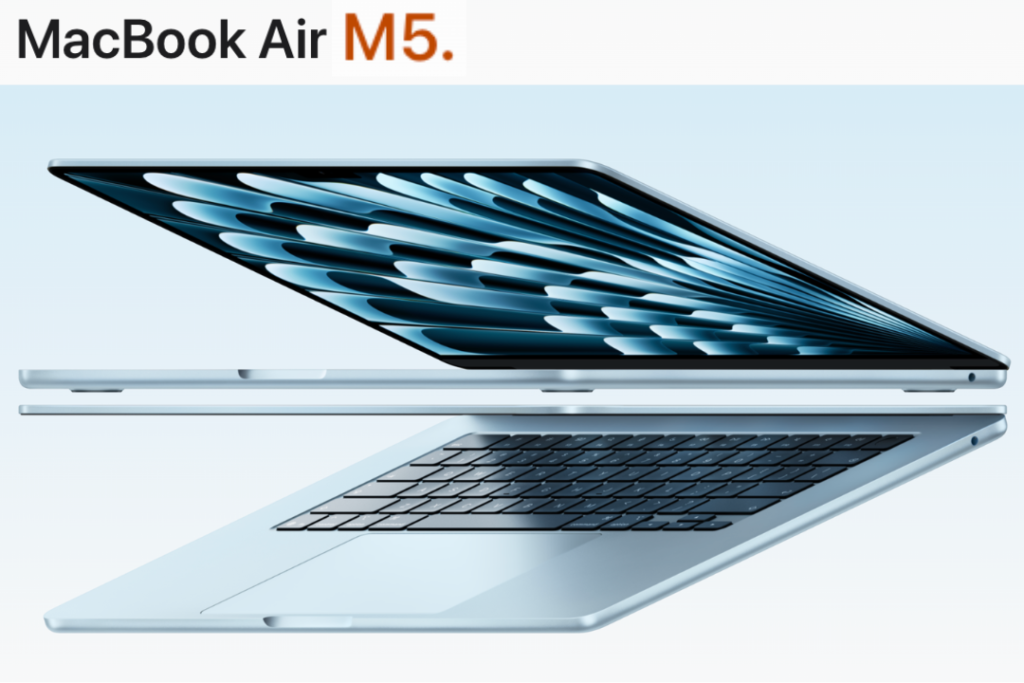
Apple didn’t reinvent the MacBook Air in 2026. It didn’t need to. With the new MacBook Air M5, Apple took the world’s most popular laptop and made it significantly faster, doubled the base storage, added Wi-Fi 7, and packed it all into the same iconic thin, silent, aluminum chassis — with a price that, while slightly higher than last year, still delivers exceptional value for what you get.
Announced on March 3, 2026, and available starting March 11, 2026, the MacBook Air M5 is Apple’s clearest statement yet: when a product is already this good, you don’t redesign it — you supercharge it from the inside.
Here is the complete, SEO-optimized MacBook Air M5 review — every spec, every performance number, every comparison you need before making your decision.
What’s New in the MacBook Air M5? (Quick Summary)
Before going deep, here’s what actually changed from the MacBook Air M4 to M5:
| What Changed | MacBook Air M4 | MacBook Air M5 |
|---|---|---|
| Chip | M4 | M5 |
| CPU Cores | 10-core | 10-core (faster) |
| GPU | Up to 10-core | Up to 10-core (Neural Accelerator per core) |
| Base Storage | 256GB | 512GB (doubled) |
| Max Storage | 2TB | 4TB (new) |
| SSD Speed | Standard | 2x faster read/write |
| Memory Bandwidth | ~120 GB/s | 153 GB/s (+28%) |
| AI Performance | Baseline | Up to 4x faster AI tasks |
| Wireless | Wi-Fi 6E | Wi-Fi 7 + Bluetooth 6 |
| Wireless Chip | Third-party | Apple N1 custom chip |
| Starting Price | $999 | $1,099 |
The $100 price increase is the one sticking point — but when you factor in the doubled base storage alone, you’re getting meaningfully more for slightly more money.
MacBook Air M5 Full Specifications (2026)
| Spec | 13-inch | 15-inch |
|---|---|---|
| Display | 13.6″ Liquid Retina | 15.3″ Liquid Retina |
| Resolution | 2560×1664 | 2880×1864 |
| Brightness | 500 nits | 500 nits |
| Color Support | 1 billion colors | 1 billion colors |
| Processor | Apple M5 (10-core CPU) | Apple M5 (10-core CPU) |
| GPU | Up to 10-core | Up to 10-core |
| Neural Engine | 16-core | 16-core |
| Base RAM | 16GB unified memory | 16GB unified memory |
| Max RAM | 32GB | 32GB |
| Base Storage | 512GB | 512GB |
| Max Storage | 4TB | 4TB |
| Battery Life | Up to 18 hours | Up to 18 hours |
| Camera | 12MP Center Stage + Desk View | 12MP Center Stage + Desk View |
| Audio | 4-speaker sound, Spatial Audio, Dolby Atmos | 6-speaker sound, Spatial Audio, Dolby Atmos |
| Mics | Three-mic array | Three-mic array |
| Ports | 2x Thunderbolt 4 + MagSafe 3 + 3.5mm | 2x Thunderbolt 4 + MagSafe 3 + 3.5mm |
| Wireless | Wi-Fi 7, Bluetooth 6 (Apple N1 chip) | Wi-Fi 7, Bluetooth 6 (Apple N1 chip) |
| Weight | ~2.7 lbs | ~3.3 lbs |
| Colors | Sky Blue, Midnight, Starlight, Silver | Sky Blue, Midnight, Starlight, Silver |
| OS | macOS Tahoe | macOS Tahoe |
| Starting Price | $1,099 ($999 education) | $1,299 ($1,199 education) |
| Availability | March 11, 2026 | March 11, 2026 |
Design & Build Quality — If It’s Not Broken, Don’t Fix It
The MacBook Air M5 keeps the exact same chassis Apple introduced with the M2 generation — and that’s entirely the right call. The thin, wedge-shaped aluminum body remains one of the most refined laptop designs ever produced. It’s light, rigid, premium to the touch, and completely silent thanks to the fanless architecture that Apple has refined over years of silicon optimization.
The 13-inch model weighs around 2.7 lbs — light enough to forget it’s in your bag. The 15-inch comes in at around 3.3 lbs, still impressively light for a larger display machine. Both feel solid without being heavy, elegant without being fragile.
The color lineup for 2026 is Sky Blue, Midnight, Starlight, and Silver. Sky Blue is the new standout — a soft, sophisticated tone that looks stunning in natural light and photographs beautifully. It’s a confident but understated statement piece.
The Magic Keyboard is backlit (a key advantage over the MacBook Neo), and the large Force Touch trackpad continues to set the industry standard for precision and gesture support. The keyboard layout is comfortable for extended typing sessions, and the function row integrates Touch ID for fast, secure authentication.
The keyboard backlight alone is a meaningful practical advantage in low-light environments — classrooms, flights, late-night work sessions — and it’s something you genuinely notice and appreciate every day.
Display — Two Sizes, Both Stunning
Both the 13.6-inch and 15.3-inch models use Liquid Retina displays at 500 nits of brightness with support for 1 billion colors and True Tone technology.
The 13.6-inch panel at 2560×1664 delivers razor-sharp text and vivid color reproduction. For students, remote workers, and anyone primarily using a single screen, it’s a perfect balance of portability and visual quality.
The 15.3-inch panel at 2880×1864 is genuinely one of the best laptop displays in its category. The extra real estate transforms the experience for creative professionals, multi-app workflows, and anyone who wants to reduce eye strain over long sessions.
One consistent note from reviewers: the lack of ProMotion (120Hz refresh rate) continues to be the one display feature where the MacBook Air trails higher-end competitors. Scrolling is smooth on macOS, but side-by-side with a ProMotion MacBook Pro, the difference is visible. For most users it’s a non-issue — but creative professionals and power users who spend hours in browser-heavy environments may notice it.
Apple has not included an OLED option at this tier. Per the current roadmap, OLED is expected to arrive first in the MacBook Pro lineup, potentially later in 2026 — the MacBook Air is expected to follow in 2027.
M5 Chip Performance — The Real Story
The M5 chip is the heart of everything new in this machine, and the performance leap is substantial — particularly for AI workloads and creative tasks.
M5 vs. M4 — Official Apple Benchmarks (February 2026 Testing)
- Up to 4x faster AI task performance vs. MacBook Air M4
- Up to 9.5x faster AI performance vs. MacBook Air M1
- Up to 1.9x faster AI video enhancement in Topaz Video vs. M4
- Up to 1.5x faster 3D ray-tracing rendering in Blender vs. M4
- Up to 1.5x faster image processing in Affinity vs. M4
- Up to 50% faster web browsing vs. Intel Core Ultra X7 PC laptop
- Up to 2x faster for more demanding tasks vs. competing Intel machines
- 153 GB/s memory bandwidth — 28% improvement over M4
What Drives the M5’s AI Advantage?
The single biggest architectural change in M5 is the addition of a Neural Accelerator in every GPU core. This distributed AI processing architecture means that machine learning tasks — image enhancement, video processing, LLM inference, on-device Apple Intelligence features — are now processed in parallel across the entire GPU, rather than being funneled purely through the Neural Engine. The result is the dramatic 4x AI performance gain over M4 that Apple is highlighting prominently.
For enterprise users or developers running local LLMs on-device, this is a genuinely significant upgrade. The MacBook Air M5 can handle small-to-medium language models locally in a way that required a MacBook Pro just one generation ago.
CPU & Memory Bandwidth
The 10-core CPU retains the same core count as M4 but runs faster — Apple credits the improvements to architectural refinements and the Tahoe-optimized performance state management. The 153 GB/s unified memory bandwidth is a meaningful 28% jump that translates directly to smoother multitasking: more apps running simultaneously, faster context switching, and quicker loading of large files and assets.
For Everyday Users
For typical workflows — web browsing, document editing, video streaming, Zoom calls, email — the M5 is overkill in the best possible way. The machine will handle everything thrown at it without hesitation, and it does so in complete silence, without a fan ever spinning up.
Storage — Finally, 512GB Standard
This is one of the most user-friendly upgrades Apple could have made, and it’s long overdue. The M5 MacBook Air now ships with 512GB as the base storage — double what the M4 launched with — and can be configured all the way up to 4TB for the first time.
More impactful than the capacity doubling is the 2x improvement in SSD read/write speeds. In practical terms, this means importing large photo libraries loads faster, booting apps is snappier, and moving large files between applications — think video projects in Final Cut, or migrating large datasets — is noticeably more responsive.
For professionals, students, and creative users who’ve always felt 256GB was a painful compromise: the 512GB base eliminates that frustration entirely.
Battery Life — 18 Hours of Real-World Freedom
Apple claims up to 18 hours of battery life, and real-world testing by reviewers consistently lands in the 13–16 hour range for mixed workloads — which is still outstanding for a laptop this thin and light.
The 18-hour Apple-tested figure is based on wireless web browsing over Wi-Fi. Heavy-duty tasks like video editing or running local AI models will reduce this — but even under demanding use, most users will get a full workday and then some without reaching for a charger.
MagSafe 3 charging is included — a practical advantage the MacBook Neo lacks. The laptop ships with a 40W Dynamic Power Adapter with 60W Max boost, and supports fast charging with the optional 70W USB-C adapter (sold separately for ~$20). You can also charge via either Thunderbolt 4 port for flexibility.
Camera, Audio & Connectivity
12MP Center Stage Camera
The 12MP FaceTime HD camera supports Center Stage (automatically keeps you framed during video calls as you move) and Desk View (shows both your face and your desk simultaneously — genuinely useful for teaching, tutoring, and demonstrations). For anyone doing frequent video calls, this is one of the best webcam setups on any laptop.
Immersive Speaker System
The 13-inch model features a 4-speaker system with Spatial Audio and Dolby Atmos support. The 15-inch model steps up to a 6-speaker system — and it sounds genuinely impressive for a laptop. Watching movies, listening to music, and taking calls all benefit from the room-filling sound quality. The three-mic array delivers clean, clear voice pickup that makes you sound professional on calls without any additional hardware.
Ports & Connectivity
- 2x Thunderbolt 4 (40 Gbps, supports up to 2 external displays)
- MagSafe 3 (dedicated charging port)
- 3.5mm headphone jack (supports high-impedance headphones)
- Wi-Fi 7 via Apple’s custom N1 wireless chip
- Bluetooth 6
The Thunderbolt 4 port support for two external displays is a meaningful productivity upgrade for desk setups — you can run the MacBook Air as a triple-screen workstation. The addition of Wi-Fi 7 via Apple’s own N1 chip (the same chip used in the MacBook Pro M5) delivers faster wireless throughput and better reliability in congested environments like office buildings and campuses.
macOS Tahoe + Apple Intelligence — The Software Experience
The MacBook Air M5 ships with macOS Tahoe, Apple’s most AI-integrated operating system to date. Here’s what that means in practice:
Apple Intelligence features included:
- Writing Tools — rewrite, proofread, and summarize across any app
- Smart Reply in Mail and Messages
- Notification summaries
- Image Playground — generate custom images on-device
- Clean Up tool in Photos
- Priority messages in Mail
- Siri with ChatGPT integration (opt-in)
- On-device LLM processing for enterprise users
All Apple Intelligence features run locally on-device via the Neural Engine and GPU Neural Accelerators, meaning your data doesn’t leave your device for the vast majority of AI tasks. This is a meaningful privacy differentiator compared to cloud-dependent AI on Windows and Android platforms.
iPhone Integration:
- iPhone Mirroring — control your iPhone from your Mac
- Universal Clipboard — copy on iPhone, paste on Mac
- Handoff — start tasks on one device, finish on another
- AirDrop, AirPlay, Sidecar (use iPad as second display)
App Ecosystem: Full access to millions of native macOS apps, including Microsoft 365, Adobe Creative Cloud, Final Cut Pro, Logic Pro, Xcode, and the complete third-party developer ecosystem. The MacBook Air M5 also runs any iPhone or iPad app natively, significantly expanding the available software library.
MacBook Air M5 (13-inch) vs. MacBook Air M5 (15-inch) — Which Size Is Right for You?
| Factor | 13-inch | 15-inch |
|---|---|---|
| Price | From $1,099 | From $1,299 |
| Display | 13.6″ | 15.3″ |
| Weight | ~2.7 lbs | ~3.3 lbs |
| Speakers | 4-speaker | 6-speaker |
| Battery Life | Up to 18 hrs | Up to 18 hrs |
| Performance | Identical | Identical |
| Best For | Portability-first users | Desk + travel hybrid users |
Choose the 13-inch if portability is your primary priority — commuting, campus, travel. The smaller size and lighter weight make a real difference when you’re moving around daily.
Choose the 15-inch if you spend more time at a desk, value screen real estate for multitasking, and enjoy a more immersive media experience. The 6-speaker audio and larger display are genuinely compelling upgrades.
MacBook Air M5 vs. MacBook Air M4 — Should You Upgrade?
If you’re currently on MacBook Air M4, here’s the honest answer:
Upgrade if you:
- Do any AI-heavy workflows (video enhancement, local LLMs, on-device ML)
- Regularly work with large files and need faster SSD speeds
- Are in a Wi-Fi 7 environment and want to take advantage of it
- Want 4TB storage option for large creative projects
Wait if you:
- Use your MacBook Air primarily for web browsing, documents, and email
- Are happy with your current storage situation
- Don’t do AI-intensive workflows
The M4 to M5 upgrade is compelling for power users and AI-focused workflows. For casual users, the M4 remains excellent — but the doubled storage and Wi-Fi 7 are day-to-day improvements that will feel meaningful over a 3–4 year ownership cycle.
MacBook Air M5 vs. MacBook Neo — The Full Comparison
Since both launched on the same day, this is the comparison most people are making:
| Feature | MacBook Air M5 (13″) | MacBook Neo |
|---|---|---|
| Price | $1,099 | $599 |
| Chip | M5 | A18 Pro |
| Base RAM | 16GB | 8GB |
| Base Storage | 512GB | 256GB |
| Max Storage | 4TB | 512GB |
| Display | 13.6″ Liquid Retina | 13″ Liquid Retina |
| Keyboard Backlight | ✅ Yes | ❌ No |
| MagSafe Charging | ✅ Yes | ❌ No |
| Thunderbolt 4 | ✅ 2 ports | ❌ USB-C only |
| Wi-Fi | Wi-Fi 7 (Apple N1) | Wi-Fi 6E |
| Camera | 12MP Center Stage | 1080p FaceTime HD |
| External Displays | Up to 2 | 1 |
| AI Performance | Up to 4x faster vs Neo | Baseline |
| Battery Life | Up to 18 hrs | Up to 16 hrs |
| Target User | Professionals, power users | Students, budget buyers |
The $500 price difference is real and meaningful. The MacBook Air M5 is objectively the more capable machine in every measurable way. But the MacBook Neo is a remarkable value for its target audience. The question isn’t which is better — it’s which is right for you.
MacBook Air M5 vs. Windows Competitors (2026)
The MacBook Air M5 competes in the $1,000–$1,300 laptop category, where Windows machines like the Dell XPS 13, Microsoft Surface Laptop 7, and Lenovo ThinkPad X1 Carbon live. Here’s how it stacks up:
- Battery life: MacBook Air’s 18 hours is unmatched — most Windows competitors deliver 10–14 hours
- Performance-per-watt: M5 Apple Silicon is still the efficiency benchmark in this category
- Build quality: Aluminum chassis is competitive with Dell and Lenovo’s premium lines
- Software ecosystem: macOS + Apple Intelligence vs. Windows 11 + Copilot AI
- AI processing: On-device AI via Neural Engine vs. mostly cloud-dependent AI on Windows
- Repairability: Both platforms are limited in this category at thin-and-light configurations
- Gaming: Windows laptops with dedicated GPUs win — the Air is not a gaming machine
For productivity, creative work, battery life, and privacy-first AI — the MacBook Air M5 leads the field. For gaming and specialized Windows-only software, the alternatives win.
Who Should Buy the MacBook Air M5?
✅ Perfect for:
- College students and postgrads who want a laptop that lasts all day and all degree program
- Creative professionals — photographers, designers, video editors — who need real processing power
- Remote workers and freelancers who move between home, office, and coffee shops
- Developers building iOS, macOS, or AI/ML applications
- Business users who want the most popular laptop among professionals
- iPhone and iPad users who want deep ecosystem integration
- Anyone upgrading from an Intel Mac or M1/M2-era MacBook Air
❌ Not ideal for:
- Hardcore gamers who need a dedicated GPU
- Video editors working with 8K RAW footage (MacBook Pro M5 Max is the right call)
- Users who specifically need HDMI or SD card slots without a hub
- Budget buyers under $900 (consider the MacBook Neo at $599)
Pricing, Configurations & Where to Buy
13-inch MacBook Air M5
| Configuration | Price |
|---|---|
| 16GB RAM / 512GB SSD | $1,099 |
| 16GB RAM / 1TB SSD | $1,299 |
| 24GB RAM / 512GB SSD | $1,299 |
| 24GB RAM / 1TB SSD | $1,499 |
| 32GB RAM / 2TB+ SSD | $1,699+ |
15-inch MacBook Air M5
| Configuration | Price |
|---|---|
| 16GB RAM / 512GB SSD | $1,299 |
| 16GB RAM / 1TB SSD | $1,499 |
| 24GB RAM / 1TB SSD | $1,699 |
| 32GB RAM / 2TB+ SSD | $1,899+ |
Education pricing saves approximately $100 on base configurations.
Pre-orders are open now. Units ship and appear in Apple Retail stores starting March 11, 2026. Available via Apple.com, Apple retail, Best Buy, Amazon, B&H, and authorized resellers.
Pros & Cons at a Glance
✅ Pros
- Exceptional M5 chip performance — especially for AI workloads
- Up to 4x faster AI tasks than M4 — a meaningful generational leap
- 512GB base storage — finally fixes a long-standing complaint
- Up to 4TB configurable storage (new for MacBook Air)
- 2x faster SSD read/write speeds
- Up to 18 hours of battery life — best-in-class
- Wi-Fi 7 + Bluetooth 6 via Apple’s own N1 chip
- 12MP Center Stage camera with Desk View
- 2 Thunderbolt 4 ports + MagSafe 3
- macOS Tahoe + full Apple Intelligence support
- Completely fanless — zero noise, always
- Two size options (13-inch and 15-inch)
- Available in Sky Blue, Midnight, Starlight, Silver
❌ Cons
- $100 price increase from M4 (now starts at $1,099)
- No ProMotion / 120Hz display
- No OLED (expected in 2027 for Air)
- Only 2 Thunderbolt ports (MacBook Pro has 3+)
- Base 16GB RAM is sufficient, but can’t be upgraded after purchase — buy what you need upfront
- No built-in SD card slot or HDMI
Final Verdict — Should You Buy the MacBook Air M5?
Yes. Emphatically yes — for the right buyer.
The MacBook Air M5 continues Apple’s tradition of making the world’s most popular laptop meaningfully better with each generation. The M5 chip’s AI performance improvements are the real story here: with a Neural Accelerator in every GPU core and up to 4x faster AI task performance than M4, this machine is built for the next wave of AI-integrated workflows, local LLM usage, and on-device intelligence.
Pair that with doubled base storage, 2x faster SSD, Wi-Fi 7, and the same class-leading battery life and fanless silence — and the MacBook Air M5 is an exceptionally well-rounded laptop that genuinely has no weaknesses for its target audience.
The $1,099 starting price is $100 more than last year. But when you factor in 512GB of standard storage, Wi-Fi 7, and the M5’s AI performance leap, it’s a reasonable ask.
If you’re a student, creative professional, remote worker, or productivity-focused user who wants the best combination of performance, battery, portability, and AI capability in a laptop today — the MacBook Air M5 is your answer.
Final Rating: ⭐⭐⭐⭐⭐ (5 out of 5) The best all-around laptop in 2026. No laptop in this form factor does more, more efficiently, with better battery life.
Frequently Asked Questions (FAQ)
When does the MacBook Air M5 come out?
The MacBook Air M5 is available for pre-order now, with general availability and retail availability starting March 11, 2026.
How much does the MacBook Air M5 cost?
The MacBook Air M5 starts at $1,099 for the 13-inch model and $1,299 for the 15-inch model. Education pricing starts at $999 (13-inch) and $1,199 (15-inch).
What chip is in the MacBook Air M5?
The MacBook Air M5 uses Apple’s M5 chip — a 10-core CPU, up to 10-core GPU with a Neural Accelerator in every GPU core, and a 16-core Neural Engine. It is the same chip generation as the base MacBook Pro M5.
Is the MacBook Air M5 worth upgrading from M4?
For AI-heavy workflows, creative professionals, and users who need more storage — yes, the upgrade is compelling. For casual everyday users already on M4, the M4 remains excellent and the upgrade is optional.
MacBook Air M5 vs MacBook Neo — which should I buy?
The MacBook Neo ($599) is ideal for students and budget buyers who want a capable everyday Mac. The MacBook Air M5 ($1,099) is the better choice for professionals, power users, and anyone who needs more performance, storage, and connectivity. The $500 difference is significant — both machines are excellent for their respective audiences.
Does the MacBook Air M5 have Wi-Fi 7?
Yes. The MacBook Air M5 includes Wi-Fi 7 and Bluetooth 6 via Apple’s custom N1 wireless chip, the same chip used in the MacBook Pro M5.
Does the MacBook Air M5 support two external displays?
Yes. Via the two Thunderbolt 4 ports, the MacBook Air M5 supports up to two external displays simultaneously, making it a powerful desk setup option.
Is there a 15-inch MacBook Air M5?
Yes. The MacBook Air M5 is available in both 13-inch and 15-inch models, both starting with the same M5 chip, 16GB RAM, and 512GB storage.
Sources: Apple Newsroom (March 3, 2026), Macworld, Six Colors, PC Guide, Tom’s Guide This review is based on official Apple specifications and pre-release coverage. Hands-on performance impressions will be updated following the March 11 retail launch.